
Dorm Room Gaming Setup: How to Game Without Taking Over the Room
Gaming in a dorm room means working with a small desk, a roommate, and limited outlets. Here's how to build a setup that actually fits the space.
In this article
Gaming in a dorm room is different from gaming at home. You have maybe four feet of desk space, a roommate three feet away, and one outlet strip to power everything. The setups that work are the ones built around those constraints, not the ones that ignore them.
This guide focuses on what fits a dorm room and what actually matters at different budget levels. For the broader tech setup your gaming rig lives within, see the Dorm Room Tech Setup Guide.
The biggest thing about using the room for anything beyond studying was the roommate factor. My roommate and I had different schedules, and the room belonged to both of us. Any setup had to fit the space and account for someone else also trying to live there, which meant headphones over speakers and keeping noise in check after a certain hour.
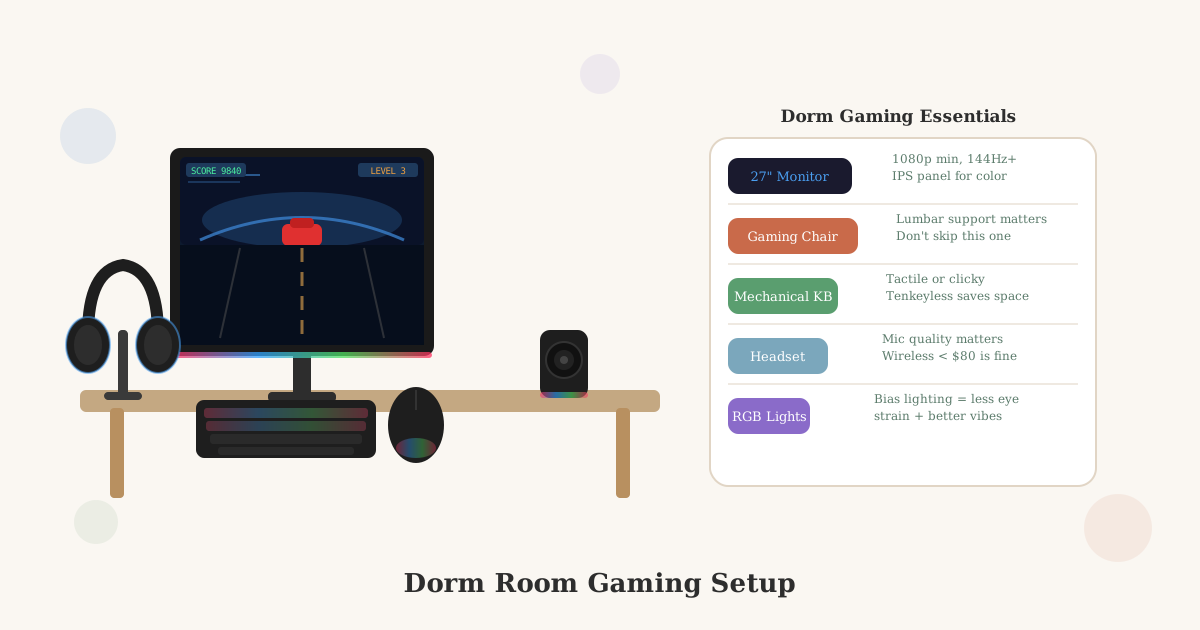
Quick answer: A 24–27 inch 1080p or 1440p monitor, a gaming headset (not speakers), a wired or low-latency wireless mouse and keyboard, and your console or PC underneath the desk covers everything. Prioritize the monitor and headset first. They make the biggest difference in a shared space. A good chair matters more than most gaming-specific gear; a decent ergonomic chair beats a $150 budget gaming chair for all-day use.
The Space Reality
A standard dorm desk is roughly 24 inches deep and 40–48 inches wide. Some are smaller. Almost none are as large as the desk you had at home.
That means:
- A 27-inch monitor leaves about 8–12 inches on either side
- A full-size keyboard takes up roughly 17 inches of width
- A mouse needs a few inches of clear surface to the right
- A water bottle, phone, and lamp take the rest
Before buying anything, measure your actual desk. The setup that fits a 48-inch desk doesn’t fit a 36-inch one.
Monitor vs. TV
Use a monitor for desk gaming. Here’s why:
TVs are designed for 6–10 feet of viewing distance. At a desk, you’re 18–24 inches away, so a 40-inch TV fills your entire field of vision and causes eye strain. TVs also have higher input lag than monitors, which makes fast-paced games feel noticeably less responsive.
A 24–27 inch monitor at 144Hz works well at desk distance, has low input lag, and doesn’t take over the entire desk surface.
When a TV makes sense: If you’re gaming from a couch or bed with a controller, a 32-inch TV on top of a dresser or bookshelf is reasonable. A TV also doubles as a screen for movie nights in the room.
What to look for in a gaming monitor
- Size: 24–27 inches for desk gaming
- Resolution: 1080p is fine at 24 inches; 1440p is worth it at 27 inches
- Refresh rate: 144Hz minimum if you play fast-paced games (shooters, racing); 60Hz is fine for story games and console play
- Panel type: IPS panels have better color and viewing angles than TN; TN panels have slightly faster response times but weaker visuals. IPS wins for most students.
- Input lag: Listed in milliseconds; lower is better. Under 5ms is good for gaming.
→ Browse 24-inch 1080p gaming monitors on Amazon
→ Browse 27-inch 1440p gaming monitors on Amazon
PC vs. Console
Console (PlayStation 5, Xbox Series X/S, Nintendo Switch)
Easier to manage in a dorm:
- No tower to find desk or floor space for
- Plug in, connect to monitor, done
- Takes up less space and generates less heat
- Simpler to pack for winter and summer breaks
- Controllers are roommate-friendly for couch co-op
The Switch is the most dorm-practical console. It works docked to a monitor or TV and as a handheld when your roommate is trying to sleep.
→ Browse gaming monitors compatible with PS5/Xbox on Amazon
Gaming PC
Worth bringing if you already own one. If you’re building from scratch:
- A desktop PC needs space for a tower, under the desk works if there’s clearance, but many dorm desks sit low
- A gaming laptop is the more practical dorm option, portable, no tower, works anywhere on campus, and doubles as your school computer
→ Browse gaming laptops on Amazon
Headset vs. Speakers
Use a headset in a dorm room. Speakers at gaming volume will bother your roommate. Even low-volume speakers bleed into a small shared space.
A good headset solves the problem completely:
- Your roommate hears nothing from your game
- You hear the game clearly with positional audio
- You can take calls and join voice chats
What to look for in a gaming headset
- Closed-back design, sealed ear cups limit sound bleed; open-back headsets sound better to you but leak audio out
- Wired or low-latency wireless, Bluetooth introduces audio delay that’s distracting in games; look for 2.4GHz wireless instead, which has near-zero latency
- Decent microphone, flip-down boom mics work well; built-in mics on the ear cup are usually worse
- Comfort over 2–3 hours, the headset you actually wear matters more than specs
→ Browse gaming headsets on Amazon
Budget option (~$40–60): HyperX Cloud Stinger, reliable, comfortable, wired, works on PC and console.
Mid-range (~$80–120): SteelSeries Arctis Nova 1 or HyperX Cloud II, better sound, better microphone, longer comfort range.
Wireless (~$100–150): Corsair HS80 or SteelSeries Arctis 7+, 2.4GHz wireless, no cable, excellent battery life.
Keyboard and Mouse
Keyboard
A tenkeyless (TKL) keyboard, one without the number pad on the right, saves about 4 inches of desk width and makes it easier to position your mouse comfortably. For a small dorm desk, TKL is the practical choice over a full-size keyboard.
Mechanical keyboards sound loud in a shared room. If you game after midnight, linear switches (like Cherry MX Red or Speed Silver) are quieter than tactile or clicky switches. O-ring dampeners reduce the sound further for about $5.
→ Browse tenkeyless gaming keyboards on Amazon
Mouse
Any wired gaming mouse with a sensor rated at 400+ DPI works for 99% of games. The marketing around gaming mice is aggressive, the difference between a $30 and $100 gaming mouse is smaller than brands suggest.
→ Browse gaming mice on Amazon
Chair
A gaming chair in a dorm room is mostly a marketing decision. The chairs with aggressive bucket-seat shapes and neck pillows are designed to look like racing seats, not to support a person sitting upright at a desk for hours.
For a dorm room, a good ergonomic chair or a mid-range task chair provides better all-day support than most gaming chairs at the same price.
What matters in a chair for long gaming sessions:
- Adjustable seat height (so your feet rest flat on the floor)
- Lumbar support, either built-in or a separate pillow
- Armrests at desk height so your shoulders stay relaxed
→ Browse ergonomic desk chairs for dorm rooms on Amazon
The Secretlab Titan and Herman Miller Aeron are excellent, and out of most college budgets. A Flexispot or Sihoo ergonomic chair in the $150–$200 range is a more realistic option that still supports your back better than most $150 gaming chairs.
Cable Management
A gaming setup generates cables: monitor power, monitor video, PC or console power, keyboard, mouse, headset. On a small desk, unmanaged cables immediately create clutter.
Simple solutions that work:
- Cable management raceway along the back of the desk, keeps cables off the desk surface
- Velcro cable ties, bundle cables together under the desk
- Cable clips. Stick to the desk edge and route cables cleanly
- A power strip with surge protection with the cables routed together to one outlet
→ Browse cable management kits on Amazon
What to Prioritize (By Budget)
$300–$500 total: Start with the monitor and headset. Use the keyboard and mouse you already own. Skip gaming-specific peripherals until you know what you actually want.
$500–$800 total: Add a TKL keyboard and a real gaming mouse. Consider a console if you don’t have a gaming PC.
$800+ total: A gaming laptop covers school and gaming in one device. Pair it with a monitor, headset, and external keyboard for desk gaming, and use it as a laptop everywhere else.
Roommate Courtesy
Before setting up:
- Tell your roommate you game and roughly when
- Agree on quiet hours, most students are fine with gaming until midnight, not fine with it at 2am
- A headset handles the audio; you handle the hours
A conversation takes five minutes and prevents weeks of tension.
Key Takeaways
- A 24–27 inch 1080p or 1440p monitor fits a dorm desk and has low input lag, better than a TV for desk gaming.
- A headset is non-negotiable in a shared room, speakers at any gaming volume will bother your roommate.
- A TKL keyboard saves desk space and is the practical choice over a full-size board.
- Consoles are simpler in a dorm, less cable management, easier to pack, no tower to find space for.
- A good ergonomic chair beats most gaming chairs at the same price for actual back support.
- Cable management matters more than aesthetics, on a small desk, clutter compounds fast.
- Talk to your roommate first, no amount of gear fixes a bad conversation about gaming hours.
For more on the desk side of your setup, see the Dorm Room Desk Setup Guide and Best Desk Accessories for Your Dorm. For the full tech picture, the Dorm Room Tech Setup Guide covers everything from power strips to printers.
Related Dorm Guides
- Dorm Room Tech Setup, full tech setup including power strip, monitors, and peripherals
- Dorm Room Desk Setup, desk layout and ergonomics that applies directly to a gaming setup
- Best Dorm Desk Accessories, cable management, risers, and organization that pair with a gaming setup
- Best Headphones for Studying, headset alternatives that work for both gaming and studying
- Best Dorm Room Chairs, ergonomic chairs that beat gaming chairs for all-day use
- Best Laptops for College, if a gaming laptop is your primary school and gaming device
Frequently Asked Questions
- Yes, but the setup needs to be scaled to the space. A dorm desk is typically 24 inches deep and 40–48 inches wide, which fits a 24–27 inch monitor, a keyboard, and a mouse without much room to spare. A gaming PC or console underneath or beside the desk, a headset instead of speakers, and compact peripherals make a full gaming setup work without taking over a shared room.
- For most dorm setups, a console (PlayStation, Xbox, or Switch) is simpler, no tower to find space for, no cable management maze, and easier to pack for breaks. A gaming PC is worth it if you already own one or game competitively. If you're starting from scratch in a dorm, a console plus a good monitor is the easier path.
- 24–27 inches at 1080p or 1440p is the practical range for a dorm desk. Anything over 27 inches starts to dominate the desk and sit uncomfortably close at typical dorm-desk distances (18–24 inches). A 24-inch 1080p monitor at 144Hz is the most common choice for college gamers, good refresh rate, affordable, and sized right for close viewing.
- A monitor is better for desk gaming. TVs have higher input lag (which makes fast games feel sluggish), are designed for viewing distances of 6–10 feet rather than 2 feet, and take up more desk or surface space. A TV is fine for console gaming from a couch or bed, if you have the space and a roommate who's okay with it. A monitor does both jobs better in a dorm context.
- A headset is the non-negotiable solution. Good gaming headsets block game audio from reaching your roommate and let you hear game sound clearly without speakers. If you game late, a closed-back headset (fully sealed ear cups) limits sound bleed more than open-back designs. Talking to your roommate early about gaming hours matters more than any gear choice.
Can you have a gaming setup in a dorm room?
Is a gaming PC or console better for a dorm room?
What size monitor should I use for a dorm gaming setup?
Should I bring a TV or a monitor to a dorm room?
How do I deal with gaming noise in a shared dorm room?